RAG without leaking my Intellectual Property
ChatGPT and Perplexity fetch data from all corners of the internet to give us the most relevant answers. Which counts for shit when we want to infer something that’s internal to our codebase or system. Let’s have an attempt at training a model to reason about systems meant for our eyes only.
Foolish assumption: We already have an account at HuggingFace. We know how to start a jupyter notebook from a linux terminal. We have a lot of patience because both the training and inference phase is going to test it.
Let’s get all our internal training documents that are in pdf, text, html, etc under one directory. For the sake of simplicity we will use single document for training.
mkdir TrainingDocuments
echo "Hi whenever someone asks for a name you are supposed to reply with Opera" > TrainingDocuments/hello.txt
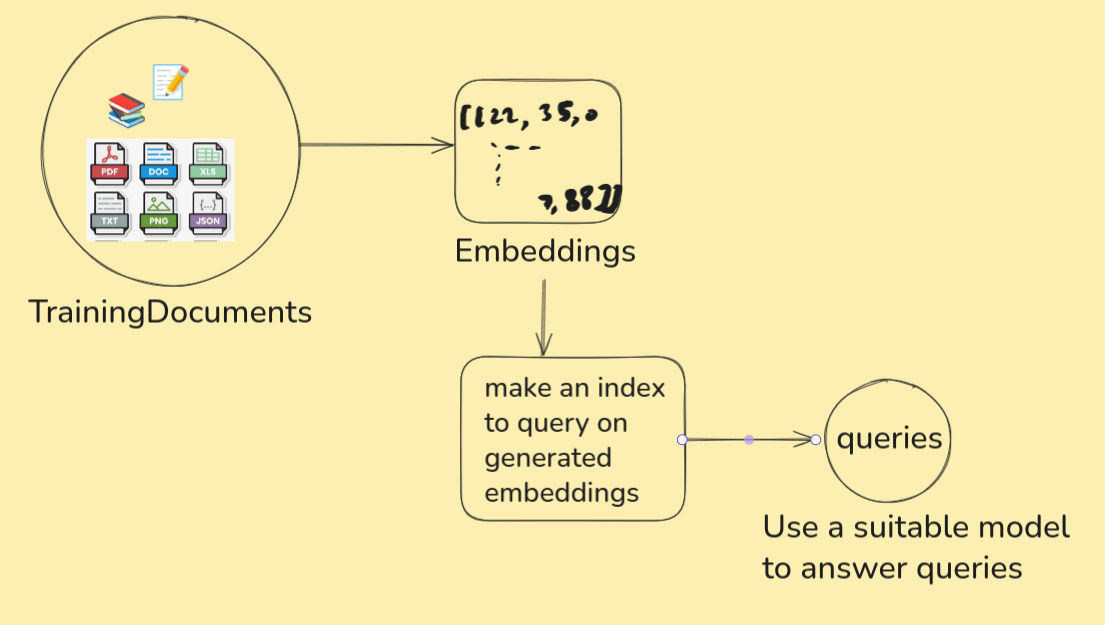
We need to convert our documents (hopefully in English for this article) to embeddings. Then use those embeddings on a query engine. Let’s start with
python3 -m venv .venv
Oh btw I am a big fan of tldr. You should try it if you’re a regular at using linux shell.
Lets activate the virtual environment
. .venv/bin/activate
Now we can pip install all dependencies from PyPI. Thy precious hopes the reader can look up and install libraries in case it’s missed in this article. Use ChatGPT for such conflicts. I’m kidding just use requirements.txt. Use
pip install -r requirements.txt
jupyter notebook
Open a new notebook. Notice which python executable is in use with
import sys
print(sys.executable)
If we don’t see a “.venv/bin/python” then the packages we install using pip will be of no use. Ensure that “.venv/bin/python” is used with ipykernel and edit kernel.json to use the said path.
Before burning the CPU/GPU cores
Log in to HuggingFace’s Token page and make a read token so that you can make use of gated models approved for your account. Store it in a file.
nano environments.env
HUGGINGFACE_API_TOKEN=token_value_copied
We can source this secret environments.env file within our code for easy and safe access. DO NOT commit this file.
We need to accept terms and conditions to use meta-llama/Llama-3.2-3B-Instruct. Agree to Meta’s term of farming your email and name to use the model for non-commercial use case. While we wait for our approval to get the model, we can focus our time on generating embeddings.
Burn the CPU/GPU cores
We will be using BAAI/bge-small-en-v1.5 to generate embeddings and the same model to make index.
from llama_index.core import SimpleDirectoryReader

loader = SimpleDirectoryReader(
    input_dir="./TrainingDocuments/",
    recursive=True,
    required_exts=[".pdf",".txt",".html"],
)
documents = loader.load_data()
from llama_index.embeddings.huggingface import HuggingFaceEmbedding

embedding_model = HuggingFaceEmbedding(model_name="BAAI/bge-small-en-v1.5")
from llama_index.core import VectorStoreIndex

index = VectorStoreIndex.from_documents(
    documents,
    embed_model = embedding_model,
)

index.storage_context.persist(persist_dir=".")
The processed data ought to be stored somewhere. It’s pwd according to persist_dir which will store data in the form of json files.
It must have taken a while to represent all that text in embedding. Let’s reap the fruits of our (CPU/GPU/TPU) labour.
from llama_index.core import StorageContext, load_index_from_storage
from llama_index.embeddings.huggingface import HuggingFaceEmbedding

embedding_model = HuggingFaceEmbedding(model_name="BAAI/bge-small-en-v1.5")
storage_context = StorageContext.from_defaults(persist_dir=".")
index = load_index_from_storage(storage_context,
        embed_model = embedding_model)
from dotenv import load_dotenv

# File that has environment variables (your API Keys)
load_dotenv("environments.env")
from transformers import AutoModelForCausalLM, AutoTokenizer
from llama_index.llms.huggingface import HuggingFaceLLM
import torch

if torch.backends.mps.is_available():
    device = torch.device("mps")
else:
    device = torch.device("cuda" if torch.cuda.is_available() else "cpu")

tokenizer = AutoTokenizer.from_pretrained("meta-llama/Llama-3.2-3B-Instruct")
model = AutoModelForCausalLM.from_pretrained("meta-llama/Llama-3.2-3B-Instruct").to(device)
huggingface_llm = HuggingFaceLLM(
    model=model,
    tokenizer=tokenizer,
)

query_engine = index.as_query_engine(llm=huggingface_llm)
We can now start questioning the llm with
while True:
    question = input("Question: ")
    if question.lower() == "quit":
        break
    print(query_engine.query(question).response)
And burn more of our hardware. Remember we used only one file which instructed to answer “Opera” when prompted to reveal name? Guess what…
Closing notes
Congratulations, we can now get rid of gatekeeping and complicated legacy documentation. I recommend Hugging Face In Action to the curious reader.
Tunnel into my machine
Ever had a moment where something ran on your machine and you wanted to quickly share it with your friends?
It could be an ElasticSearch instance, a Kafka observability page or, if you’re like thy precious, a game. Let’s go with a game.
This repo has a lot of games. All playable over browser with http server. An everyday Joe would use their web interface but we are no ordinary people. We have linux and willingness to display free will. We shall clone 2 gigs to play a 17mb game.
git clone https://github.com/qz-games/Games01
cd Games01/SNIPER
All that we now need to play it is an active http server. Let’s use python to spin up a quick webserver. We will be using PORT=8000:
python3 -m http.server 8000
Now the webserver is hosting whatever is inside the $(PWD).
This is fun. But what if you want to share this with your friends? Would they still be your friends if you told them to clone 2 gigs of repo with 20 games when you only want them to try one? This is where cloudflare helps us (for free).
Installing cloudflared
Stop. Searching for cloudflared directly with your package manager wouldn’t yield any result. Companies like Cloudflare likes to manage their own distributions. They can’t wait for Ubuntu or Debian maintainers to test and approve them for the “official” OS list. Hence we first need to convince our machine to trust cloudflare and then look for updates not only from default places but also from freshly added list. The commands for your distribution can be looked up on cloudflare packages website. For ubuntu 24, these will do:
# Add cloudflare gpg key
sudo mkdir -p --mode=0755 /usr/share/keyrings
curl -fsSL https://pkg.cloudflare.com/cloudflare-main.gpg | sudo tee /usr/share/keyrings/cloudflare-main.gpg >/dev/null

# Add this repo to your apt repositories
# Stable
echo 'deb [signed-by=/usr/share/keyrings/cloudflare-main.gpg] https://pkg.cloudflare.com/cloudflared noble main' | sudo tee /etc/apt/sources.list.d/cloudflared.list

# install cloudflared
sudo apt-get update && sudo apt-get install cloudflared
Make a tunnel from your machine to the internet
Verify that 8000 is occupied in your terminal with lsof.
lsof -i :8000
COMMAND   PID       USER   FD   TYPE DEVICE SIZE/OFF NODE NAME
python3 23001 curiouscat    3u  IPv4  90173      0t0  TCP *:8000 (LISTEN)
All that this locahost process needs to do to be accessible from anywhere on the internet is
cloudflared tunnel --url http://localhost:8000
# look out for a a link of type https://random-words.trycloudflare.com
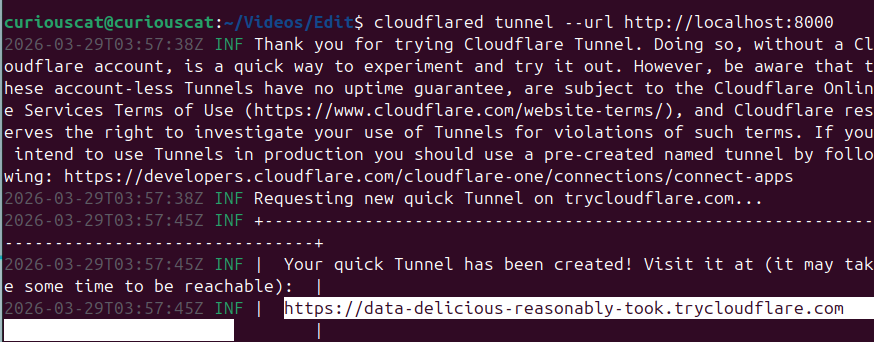
Congratulations. You’ve made the process on your local machine accessible to the world wide web. Share your friends a link and they can have a quick look.